 d39835fb09
* Add new gifs for crud builder

* Add links

* Update object-inheritance

* Update variables context file with gif and link. Add object inheritance images.

* Update variable environments article.
129 lines
5.3 KiB
Markdown
129 lines
5.3 KiB
Markdown
# Using the CRUD Builder
|
|
|
|
Stoplight's CRUD builder allows you to easily design and model data structures
|
|
used by your API. The CRUD builder is especially useful for:
|
|
|
|
* Drafting API requests and response bodies under an API endpoint
|
|
* Creating [models](/modeling/modeling-with-openapi/api-models) for your API
|
|
* Creating [shared responses](/modeling/modeling-with-openapi/shared-parameters-and-responses) for
|
|
re-use across multiple endpoints
|
|
|
|
There are three different methods for generating a CRUD model:
|
|
|
|
* Using the CRUD builder **editor**, which allows you to create data structures
|
|
in an easy-to-use, graphical format
|
|
|
|
* Using the **Generate from JSON** feature, which allows you to copy and paste
|
|
an existing JSON document into the CRUD builder to have a model automatically
|
|
generated for you
|
|
|
|
* Using the **Raw Schema** editor, if you would prefer to modify the data
|
|
structure with raw JSON
|
|
|
|
While each method can be used individually, you will most likely find yourself
|
|
using a combination of all three while drafting API endpoints, models, and
|
|
shared responses.
|
|
|
|
## Using the Editor
|
|
|
|
|
|
|
|
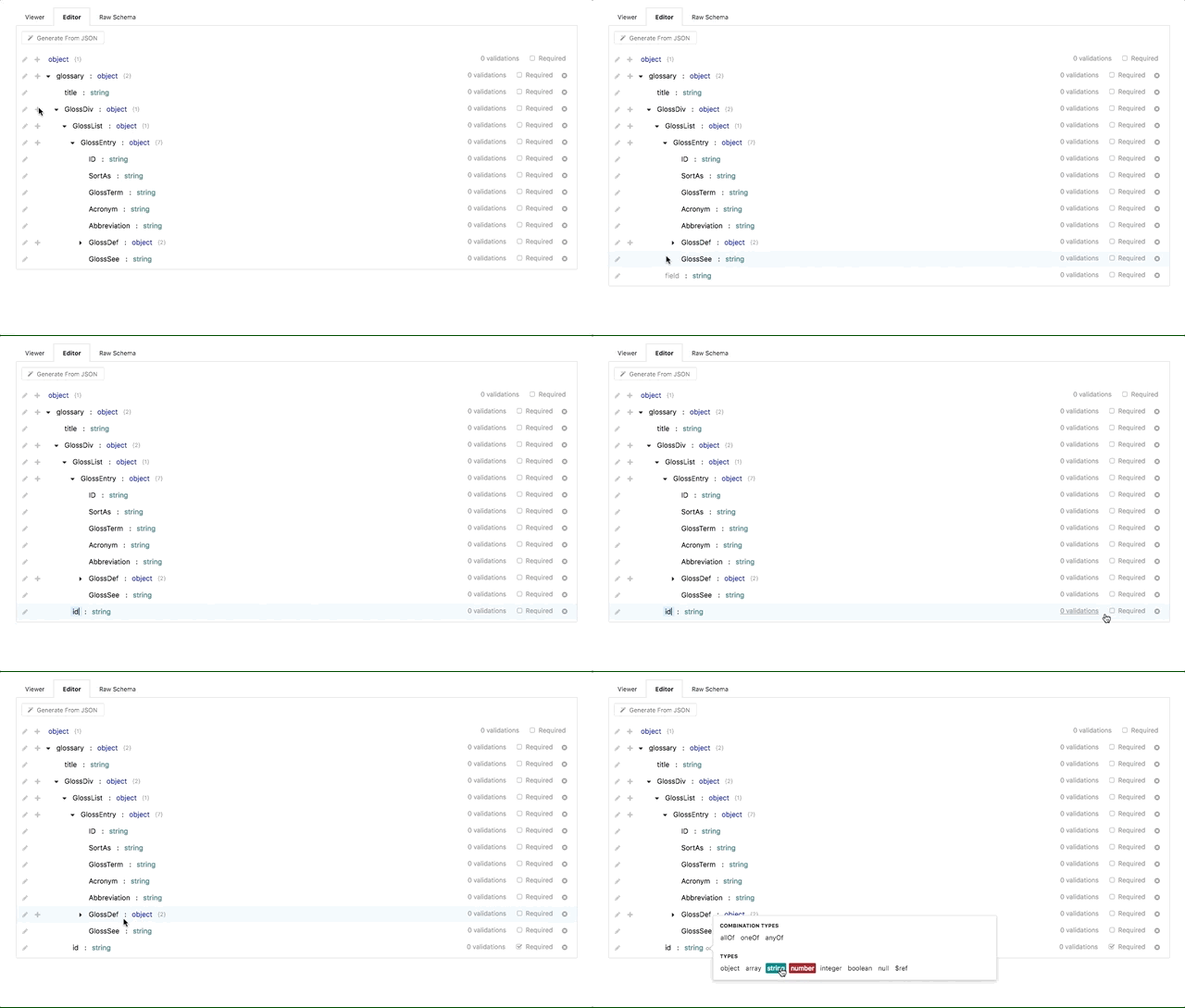
We created the CRUD builder editor to make data structure creation as simple as
|
|
possible. You can find the CRUD builder editor under the **Editor** tab under
|
|
any request, response, or model view.
|
|
|
|
To start utilizing the editor:
|
|
|
|
* Click the **+** (plus) icon next to the root **object** to start adding fields
|
|
to the data structure. The plus icon can also be used on nested objects to
|
|
create a hierarchy of arbitrarily-nested data structures
|
|
|
|
* Set the **field name** (or _key_) of a data field by clicking the text label
|
|
to the left of the newly-created field. Field names can be composed of any
|
|
alpha-numeric characters, but can only be specified once. You will receive an
|
|
error if you try to re-use field names multiple times on the same level
|
|
(though they can be re-used on nested objects)
|
|
|
|
* Set the **type** of a field by clicking the _string_ label to the right of
|
|
the field name. The default type for a newly-created field is 'string',
|
|
however other types include:
|
|
|
|
* objects (for nesting objects)
|
|
* arrays
|
|
* numbers
|
|
* integers
|
|
* booleans
|
|
* nulls
|
|
* [references](/modeling/json-best-practices/reducing-duplication-with-refs)
|
|
|
|
Field types can also include _Combination Types_, which include 'allOf',
|
|
'oneOf', and 'anyOf'. These special types allow for object inheritance from
|
|
other data structures and models, and discussed in more detail
|
|
[here](/modeling/json-best-practices/object-inheritance).
|
|
|
|
* Optionally, you can set extra validations on the field, for example:
|
|
|
|
* **Enumerations** (or _enums_ for short) allow you to restrict the contents
|
|
of the field to be specific values. For example, if you are creating a
|
|
'color' field of type string, you may want to restrict the strings used in
|
|
that field to specific colors (red, blue, green, etc).
|
|
|
|
* **Format** allows for validating the field value is of a specific format. A
|
|
few common format validations include: date, time, date-time, URI, and
|
|
email.
|
|
|
|
In addition to the validations listed above, there are also per-type
|
|
validations that can be used depending on the type of the field. For example,
|
|
string validations include setting a minimum/maximum length and regex pattern.
|
|
For numbers, you can set minimum/maximum values and even validate that the
|
|
numeric value is a multiple.
|
|
|
|
* Optionally, you can specify a field as **required**, which ensures that the
|
|
field is present in all requests (and an error is thrown otherwise).
|
|
|
|
## Generating from JSON
|
|
|
|
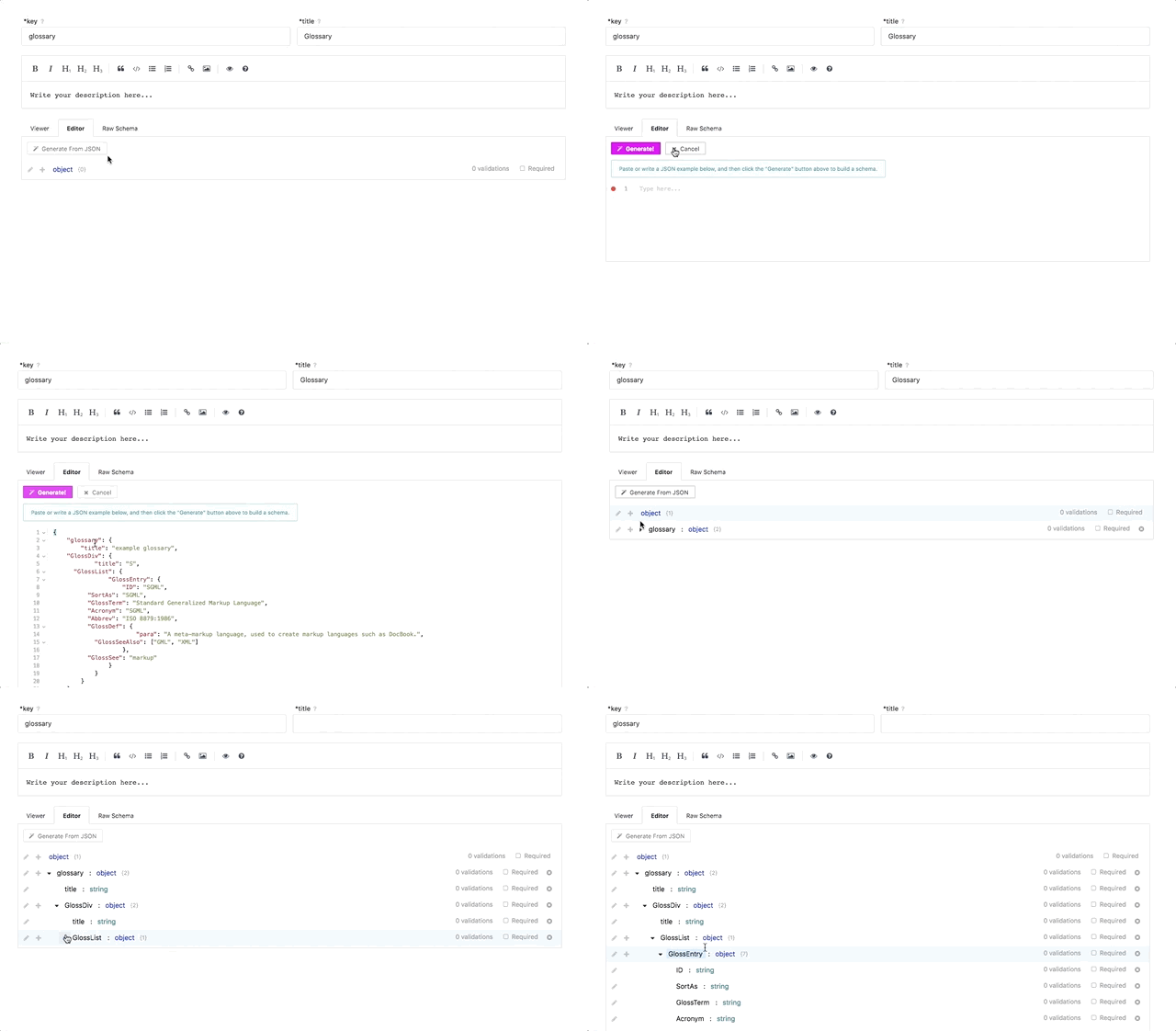
If you have a pre-existing JSON document that you would like to convert to a
|
|
Stoplight data structure, the **Generate from JSON** button available towards
|
|
the top of the CRUD editor allows you to do just that.
|
|
|
|
|
|
|
|
To start:
|
|
|
|
* Click the **Generate from JSON** button, opening a text input
|
|
|
|
* Either paste or write the contents of the desired JSON object into the text input
|
|
|
|
* Click the **Generate** button
|
|
|
|
And that's it! The JSON document will automatically be converted into a
|
|
Stoplight data structure, able to be included as models, request/response
|
|
bodies, and shared responses.
|
|
|
|
> The result of a **Generate from JSON** can also be edited using the CRUD
|
|
> editor once it is generated, so you can still modify and add validations
|
|
> afterwards.
|
|
|
|
## Editing the Raw JSON Schema
|
|
|
|
|
|
|
|
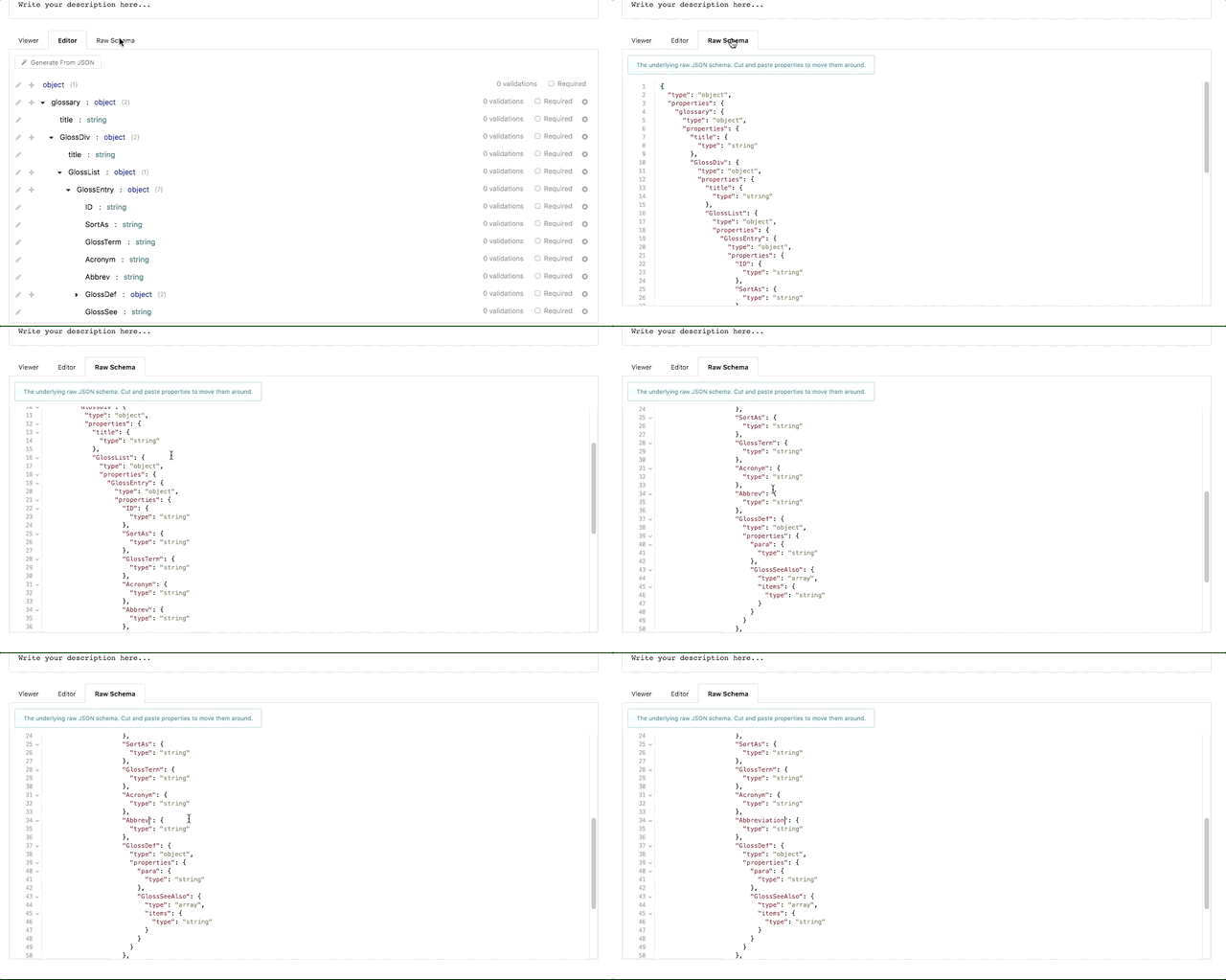
While not for the faint hearted, you can also edit the raw JSON schema directly
|
|
if you are familiar with the format, or have a pre-existing JSON schema
|
|
representation of your data structure.
|
|
|
|
To edit the raw JSON schema, click the **Raw Schema** tab next to the **Editor**
|
|
tab. This will open a text box with the JSON schema of the current object. From
|
|
there, you can either edit or copy and paste contents directly into the text box
|
|
to update the data structure.
|
|
|
|
---
|
|
|
|
**Related**
|
|
|
|
* [API Modeling Overview](/modeling/introduction)
|
|
* [Shared Parameters and Responses Overview](/modeling/modeling-with-openapi/shared-parameters-and-responses)
|
|
* [References Overview](/modeling/json-best-practices/reducing-duplication-with-refs)
|
|
* [Object Inheritance](/modeling/json-best-practices/object-inheritance)
|